1. Submit
Use the CLI or a workplan to create a task with capability tags (ollama, codex, shell, …).
Alpha v0.6.0
Workplane is a control plane for shell tasks, local inference, and AI agent harnesses — on your laptop, home server, and GPU box. Compose multi-step workplans that mix local Ollama with frontier APIs, over Tailscale, WireGuard, or a private LAN.
npm install -g workplane
workplane-setup        # configure + migrate in one step

# Run a built-in skill locally — no server needed
workplane skill run code-review --repo .Nodes pull work outbound — no inbound ports on workers. You get durable state, logs, artifacts, and retries without SSH session juggling.
Use the CLI or a workplan to create a task with capability tags (ollama, codex, shell, …).
The scheduler assigns work to an online node whose capabilities match requires. Inline steps (Anthropic, Ollama) skip the fleet entirely.
Adapters run in an isolated workspace — clone, branch, capture diffs and logs. Interactive sessions route PTY input through the control plane.
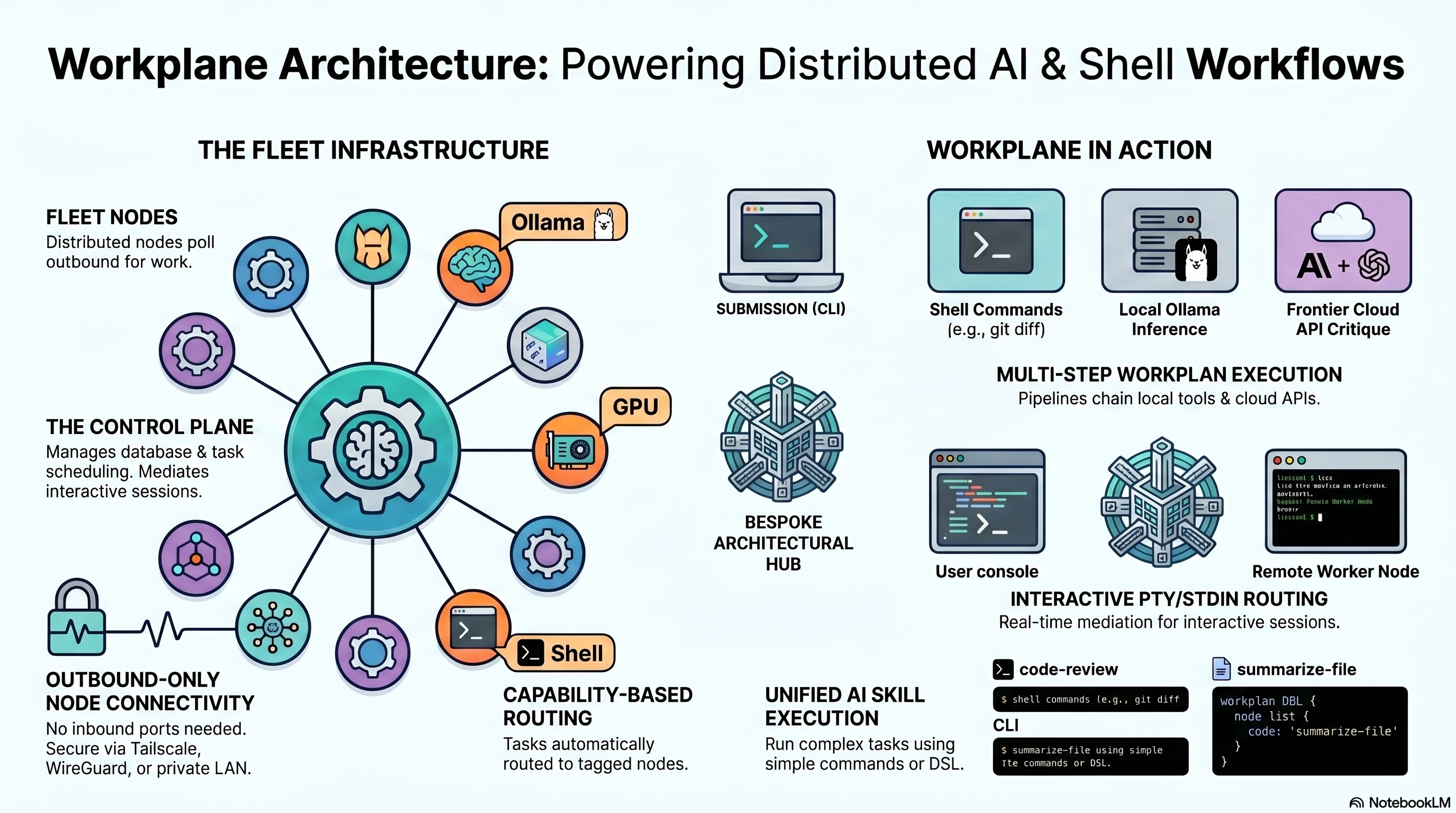
Compose sequences of inference and shell steps. Mix cheap local models with frontier APIs in a single pipeline — cost-aware by design.
Define ordered steps with provider, model, and output routing.
Chain step output with dest: "next" and {{prevOutput}} substitution.
Steps with provider: "anthropic", "openai", "ollama", "shell", or "file"
run inline — no fleet node required.
Pre-built workplans via workplane skill run. Ships with code-review
(diff → ollama → anthropic), summarize-file, and hello (scheduler smoke test).
Cron schedules for skills via workplane schedule create. The server ticks in the background,
enqueues due runs, and tracks results with workplan-runs.
// Define a workplan
const plan = {
  id: "review", name: "Code Review",
  steps: [
    { id: "diff",      provider: "shell",     payload: { command: "git diff HEAD~1" },
                       output: { dest: "next" } },
    { id: "summarize", provider: "ollama",    model: "llama3",
                       payload: { prompt: "Summarize:\n{{prevOutput}}" },
                       output: { dest: "next" } },
    { id: "critique",  provider: "anthropic", model: "claude-haiku-4-5-20251001",
                       payload: { prompt: "Review this:\n{{prevOutput}}" } },
  ],
};

await new SequentialWorkplanRunner().run(plan, new LocalWorkplanContext());
Or use the CLI: workplane skill run code-review --repo . --model claude-haiku-4-5-20251001
# Schedule the hello skill (cron, UTC)
workplane schedule create hello \
  --cron "0 9 * * *" \
  --timezone UTC \
  --input message=hello

workplane schedule list
workplane workplan-runsExtensible execution — agents and inference are adapters, not the core.
| Adapter | Kind | Modes | Capabilities |
|---|---|---|---|
shell |
shell.exec | batch | shell |
ollama |
inference.batch | batch | ollama |
aider |
agent.run | batch | git, aider |
codex |
agent.run | batch, interactive (stdio) | git, codex |
claude-code |
agent.run | batch, interactive (PTY) | git, claude-code |
Interactive sessions route PTY/stdin input through the control plane with no direct client-to-node connection. SIGTERM escalates to SIGKILL after 5 seconds.
Use workplane as a library — import the workplan runner and skill engine directly without the fleet infrastructure.
@workplane/workplans
Workplan DSL, sequential runner, inline providers, ScheduleBuilder.
npm i @workplane/workplans@workplane/agent-skills
Pre-built skills, SkillRegistry, CanonicalSkillWorkflow interface.
npm i @workplane/agent-skills@workplane/dbos
Optional DBOS durability layer. Step checkpointing and replay without changing workplan definitions.
npm i @workplane/dbos@workplane/adapter-sdk
Build custom adapters. WorkAdapter, WorkContext, cancellable exec.
npm i @workplane/adapter-sdk@workplane/types
Shared TypeScript types across the entire workplane package ecosystem.
npm i @workplane/types@workplane/core
Config loading, HTTP client, auth, git utilities — shared by all workplane packages.
npm i @workplane/core
All adapter packages are also published individually:
@workplane/adapter-shell, @workplane/adapter-ollama,
@workplane/adapter-aider, @workplane/adapter-harness,
@workplane/adapter-claude-code, @workplane/adapter-codex.
Node.js 20+. No Postgres required for a single-machine fleet.
npm install -g workplaneworkplane skill run summarize-file --file ./README.mdnpm install -g workplaneworkplane-setup — interactive wizard, press Enter for defaultsworkplane-server (terminal 1) & workplane-node (terminal 2)workplane task submit shell --command "echo hello"
workplane-setup generates auth tokens, configures SQLite at
~/.workplane/workplane.db by default, and runs migrations.
Re-run it at any time to switch to Postgres or update tokens.